

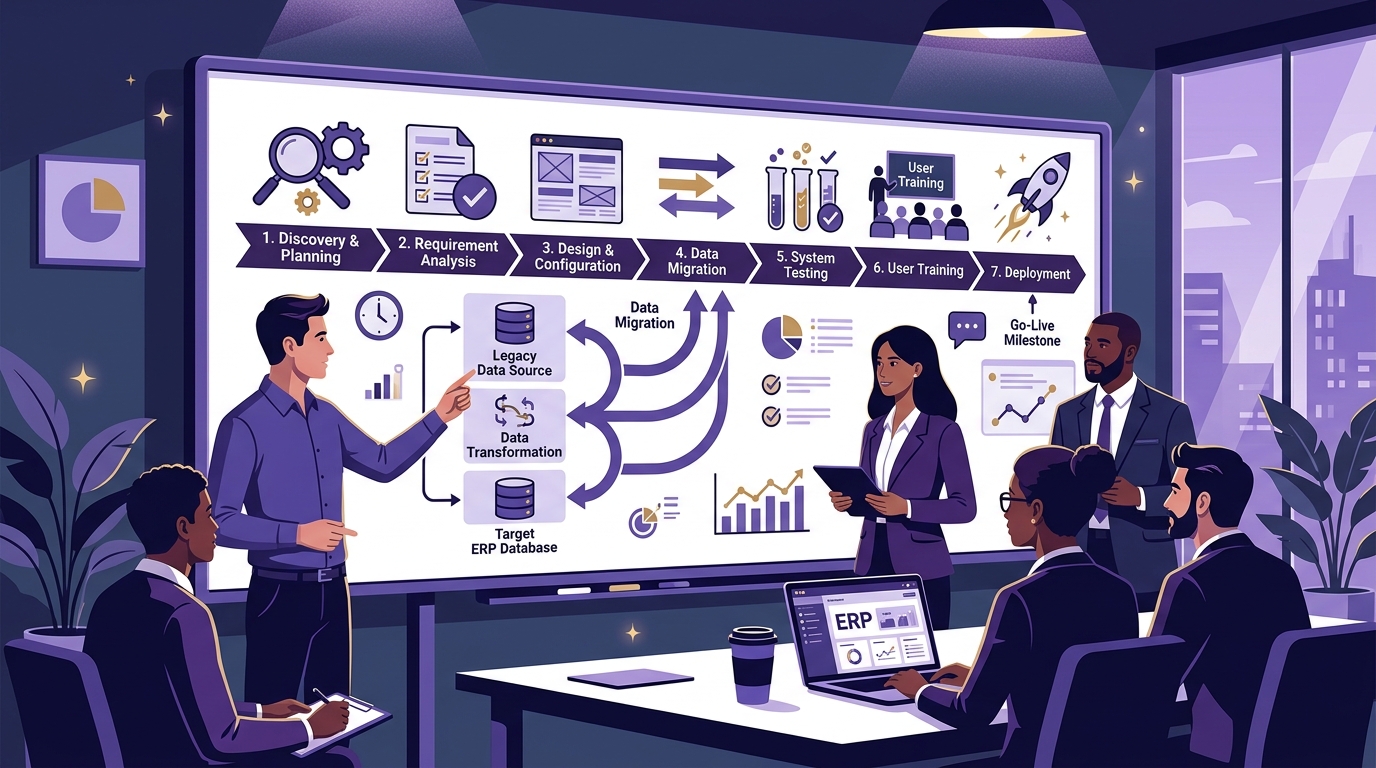
Implementing an Enterprise Resource Planning (ERP) system is a transformative milestone for any growing business. The right ERP connects sales, purchasing, inventory, production, finance, warehouse operations, and executive reporting in one centralized platform.
However, buying ERP software is only the beginning. A successful rollout requires disciplined project planning, data cleansing, process mapping, configuration, validation testing, user training, and dedicated post-launch support.
If implementation is poorly planned, even the most capable ERP can fail to deliver results. Staff may resist changes, uncleaned legacy data creates confusion, and project costs can balloon. This guide provides a practical, step-by-step framework to ensure your ERP implementation succeeds on time and within budget.
Quick Answer: What Is ERP Implementation?
ERP implementation is the systematic process of planning, configuring, deploying, testing, and adopting ERP software within an organization. It adapts the technology to your real-world business workflows, cleans and migrates legacy data, integrates factory hardware, trains departmental teams, and establishes a stabilized foundation for scalable business growth.
ERP Installation vs. ERP Implementation
These two concepts are frequently confused, but they represent entirely different scopes:
ERP Installation (Technical)
- Setting up servers or cloud hosting
- Installing database & application binaries
- Creating default administrator credentials
- Result: A blank, unused software instance
ERP Implementation (Business)
- Mapping real departmental workflows & approvals
- Cleaning and migrating legacy master data
- Configuring multi-level BOMs & work centers
- Training employees & establishing SOPs
- Result: A live, synchronized business platform
The Complete ERP Implementation Lifecycle
A structured implementation follows a clear, multi-stage roadmap:
Phase 1: Discovery, Team Formation & Process Mapping
1. Define Business Objectives & Quantifiable KPIs
Never start implementation with software features. Start with the operational bottlenecks you need to solve:
- Stock Discrepancies: Target 99%+ inventory accuracy across all warehouses.
- Production Delays: Eliminate machine halts caused by missing raw materials.
- Reporting Lag: Replace weekly spreadsheet consolidation with instant live KPI dashboards.
- Order Fulfillment: Reduce customer quote-to-dispatch lead time by 30%.
2. Assemble an Internal Cross-Functional Project Team
ERP projects succeed when internal business champions actively participate alongside technical consultants:
| Role | Key Responsibilities | Typical Team Member |
|---|---|---|
| Executive Sponsor | Strategic oversight, budget approvals, and change leadership | Managing Director / CEO / Plant Head |
| Project Manager | Timeline tracking, milestone delivery, and issue escalation | Operations Head / Senior IT Manager |
| Department Champions | Workflow verification, UAT testing, and peer training | Store Head, Sales Lead, Accounts Manager |
| ERP Technical Lead | System configuration, data migration, and API integrations | Uttercode Implementation Consultant |
3. Document Existing Workflows & Conduct Gap Analysis
Document how physical transactions currently move from sales quotation to procurement, stores receipt, machine routing, and tax invoicing. Identify bottlenecks, duplicate spreadsheet entries, and approval loops that can be automated inside the ERP.
Phase 2: System Configuration, Data Cleansing & Migration
4. Modular Configuration vs. Customization
Follow the fundamental golden rule of ERP implementations:
Excessive custom coding increases project costs, delays timelines, and complicates future software updates.
5. Master Data Cleansing Protocol
The single biggest cause of post-go-live confusion is importing unverified legacy data. Clean your data before importing:
6. The 6-Stage Data Migration Protocol
Data migration moves through six controlled stages:
2. CLEAN → Eliminate inactive items, invalid tax IDs, and duplicate contacts.
3. TRANSFORM → Map fields to ERP database schemas and standard formats.
4. VALIDATE → Run trial imports in a sandbox environment to check validation rules.
5. IMPORT → Execute final master and opening balance imports.
6. VERIFY → Department heads sign off on imported trial balance sheets and stock ledgers.
7. Hardware & Third-Party System Integrations
Connect factory hardware and third-party tools via standard REST APIs before user testing begins:
- Barcode and QR label printers & shop-floor scanners
- Digital weighbridges and weighing scales
- Payment gateways, banking APIs, and e-Way bill / e-Invoicing portals
- Biometric attendance systems for labor costing
Phase 3: System Testing, UAT & Role-Specific Training
8. Multi-Tiered System Testing
Ensure every operational layer is validated before production rollout:
- Functional Testing: Verify individual screens, field validations, and custom print layouts.
- Integration Testing: Ensure sales orders trigger automated MRP shortages and purchase requisitions.
- End-to-End Simulation: Execute a full factory cycle from customer PO to machine routing, quality inspection, dispatch, and accounting.
- User Acceptance Testing (UAT): Department heads independently perform daily tasks to confirm usability.
9. Department-Specific Training & SOP Creation
Avoid generic company-wide demos. Conduct focused, role-specific training sessions:
Sales & Stores
Quotation drafting, price lists, GRN creation, stock transfers, and barcode scanning.
Production & QC
Job card execution, machine time tracking, scrap recording, and inspection gates.
Accounts & Execs
GST invoices, payment reconciliation, aging reports, and live KPI dashboards.
Go-Live Deployment Strategies: Big Bang vs. Phased Rollout
Choosing the right cutover strategy depends on organizational complexity and risk tolerance:
| Deployment Strategy | How It Works | Pros & Cons | Best Suited For |
|---|---|---|---|
| Big Bang Cutover | All departments transition to the new ERP simultaneously on a designated date. | + Faster
transition - Higher operational risk |
Small businesses & single-facility operations |
| Phased by Module | Core modules (Sales, Purchasing, Stores) launch first, followed by Manufacturing & Finance in Phase 2. | + Lower risk & smoother
training - Longer overall timeline |
Growing SMEs & manufacturing enterprises |
| Phased by Location | ERP goes live at one plant or warehouse first before expanding to other branches. | + Isolated testing
ground - Requires temporary data bridges |
Multi-plant & multi-branch organizations |
Comprehensive Pre-Go-Live Verification Checklist
Do not proceed to cutover until all pre-flight checks are verified:
System & Data Readiness
- Clean master data imported & signed off
- Opening inventory counts verified with physical stock
- Open sales & purchase orders transitioned
- Automated off-site database backups configured
User & Operational Readiness
- User accounts created with role-based permissions
- Departmental training completed and SOPs distributed
- Barcode scanners & hardware printers tested
- Hypercare support escalation team standing by
8 Common Implementation Traps & How to Avoid Them
1. Unclear Project Scope & Scope Creep
Solution: Lock in Phase 1 deliverables before starting. Treat additional feature requests as Phase 2 enhancements.
2. Migrating Dirty Spreadsheet Data
Solution: Enforce strict data hygiene. Never import old unverified spreadsheets into the new database.
3. Excessive Customization of Standard Workflows
Solution: Adapt internal business processes to proven ERP standards rather than rewriting core software logic.
4. Lack of Executive Leadership Involvement
Solution: Assign a dedicated executive sponsor to resolve inter-departmental conflicts and maintain momentum.
5. Inadequate Employee Training & Resistance
Solution: Conduct role-based hands-on workshops and clearly demonstrate how the ERP saves time on daily tasks.
6. Skipping Real-World End-to-End Testing
Solution: Run complete simulations of real factory scenarios before cutting over to live operations.
7. Unrealistic Go-Live Timelines
Solution: Build buffer time into milestone schedules for data cleansing, integrations, and UAT sign-off.
8. Neglecting Post-Go-Live Support
Solution: Establish a dedicated 30-day hypercare helpdesk to resolve early user queries immediately.
Real-World Example: Manufacturing ERP Implementation
Consider an industrial packaging and machinery manufacturer transitioning from scattered spreadsheets to an integrated ERP:
The Connected Manufacturing Workflow Validated in UAT:
By testing this unified transaction pipeline with actual factory batch sizes, the company achieved 100% data alignment between stores, purchasing, shop-floor supervisors, and the finance department on day one of go-live.
How Uttercode ERP Powers Smooth Implementations
Uttercode ERP combines modular enterprise software with a structured, guided implementation methodology designed to eliminate operational downtime.
Our implementation specialists work directly with your leadership and departmental heads to configure multi-level BOMs, automate procurement workflows, integrate shop-floor hardware, and provide comprehensive user training.
Ready for a Seamless ERP Implementation?
Speak with our ERP implementation specialists to map your business processes, define project milestones, and explore a live demo tailored to your workflows.
Frequently Asked Questions
What is ERP implementation?
ERP implementation is the process of planning, configuring, deploying, testing, and adopting ERP software within an organization, including business process mapping, data migration, integration, user training, and post-go-live support.
How long does ERP implementation take?
Implementation duration depends on business size, module count, data quality, customization, hardware integrations, and training requirements. Small deployments take 4-8 weeks, while complex manufacturing multi-plant rollouts take 3-6 months.
What are the main stages of ERP implementation?
The main stages include Discovery & Requirements Analysis, Process Mapping, Configuration, Data Preparation & Migration, Integration, System & UAT Testing, User Training, Go-Live Deployment, and Post-Launch Hypercare Support.
What is ERP data migration?
ERP data migration is the structured process of extracting, cleaning, transforming, and importing relevant master data (customers, vendors, items, BOMs) and opening balances from legacy spreadsheets into the new ERP database.
Why do some ERP implementations fail?
ERP projects fail primarily due to poor requirement scoping, importing dirty unverified data, excessive custom coding, lack of leadership involvement, inadequate employee training, and skipping real-world end-to-end testing.
Should all ERP modules be implemented at once?
Not necessarily. Phased implementations (e.g. Sales, Purchasing & Inventory in Phase 1; Manufacturing & MRP in Phase 2; Finance & Analytics in Phase 3) reduce operational risk and simplify user change management.
Can ERP software be customized?
Yes, but customization should follow the golden rule: configure existing settings wherever possible, and customize code only when a mission-critical business workflow cannot be handled through standard capabilities.
What happens after ERP goes live?
The organization enters a 30-day hypercare stabilization period where the implementation team monitors transaction volume, resolves user queries, validates reports, and optimizes workflows.
How do you measure ERP implementation success?
ERP success is measured through concrete operational KPIs such as inventory accuracy, order fulfillment speed, reduction in manual data entry, faster financial closing, and scrap rate reductions.
Conclusion
ERP implementation is a strategic business transformation project, not merely a software installation. Success requires seamless alignment between your people, business processes, data, and technology.
By investing time into process mapping, cleaning master data, running thorough end-to-end tests, and providing role-based employee training, you establish a resilient operational system that powers your business for decades.
"The success of an ERP project is not measured by whether the software goes live. It is measured by whether the business works better after it goes live."