

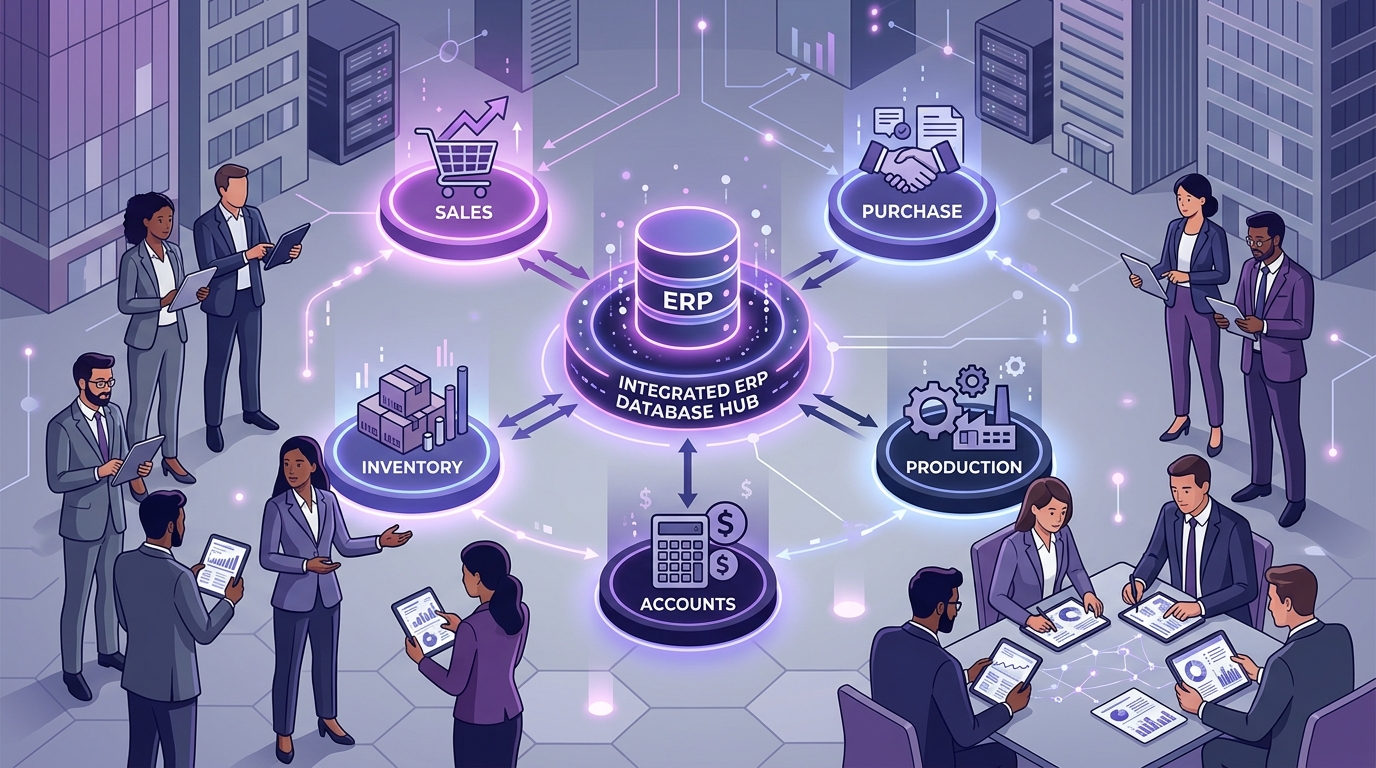
In a growing business, sales, purchasing, inventory, production, and accounts are not isolated departments. They are interconnected gears in the exact same business operating cycle.
A customer confirms an order. That order creates a manufacturing requirement. Manufacturing explodes a multi-level Bill of Materials (BOM) to check raw material availability. Free stock is reserved, while shortages trigger automated purchase orders. Suppliers deliver materials to the warehouse, updating physical stock and logging accounts payable. The shop floor consumes those materials, builds finished goods, and passes quality inspection. The dispatch team delivers the product, triggering a GST tax invoice, accounts receivable ledger, and customer payment reconciliation.
When these five functions operate in silos using disconnected spreadsheets, emails, and phone calls, operational friction explodes. Integrated ERP software unites these departments into one synchronized operating system, allowing business transactions to flow seamlessly from inquiry to bank reconciliation.
Quick Answer: How Does ERP Connect Different Departments?
ERP connects business departments by maintaining a centralized relational database and standardized transaction pipelines. When one department performs an action—such as booking a sales order, receiving vendor goods, or completing a production batch—the ERP automatically updates stock balances, triggers downstream procurement or manufacturing tasks, and posts real-time financial entries to the general ledger without manual re-typing.
The 5 Core Pillars of an Integrated ERP Architecture
Every operational transaction flows through five core integrated modules:
1. Sales & CRM
Customer inquiries, price quotations, sales orders, credit checks, and delivery dispatch schedules.
2. Procurement
Supplier management, automated purchase requisitions, PO creation, and goods receipts (GRN).
3. Inventory & Stores
Multi-warehouse stock, stock reservations (ATP), batch/serial tracking, and location transfers.
4. Manufacturing & QC
Multi-level BOM explosions, work-center routing, job cards, scrap recording, and finished goods QC gates.
5. Finance & Accounts
GST invoicing, 3-way match AP, accounts receivable aging, general ledger, and P&L statements.
15 Critical Cross-Departmental Linkages in Modern ERP
1. Sales Connects Customer Demand With the Enterprise
Sales captures customer requirements through formal quotations and confirmed Sales Orders. In an integrated ERP, this transaction becomes instantly visible across the entire supply chain based on user roles.
2. Sales Orders Trigger Automated Production Requirements
When a sales order is booked for custom or made-to-order items, ERP checks finished goods inventory. If existing stock is insufficient, the system automatically creates a production demand schedule.
3. Production Connects With the Multi-Level Bill of Materials (BOM)
ERP explodes the product's BOM, calculating the exact quantity of raw materials, sub-assemblies, fasteners, and packaging required to manufacture the ordered batch.
4. Production Connects With Free & Reserved Inventory
The Material Requirements Planning (MRP) engine cross-references required BOM components against current warehouse inventory, immediately reserving available stock to prevent double-allocation.
5. Inventory Shortages Automatically Trigger Purchase Requisitions
When required raw materials fall below required production levels, ERP automatically generates Purchase Requisitions (PR) for the purchasing team with recommended quantities and vendor lead times.
6. Purchasing Connects With Suppliers via POs & Lead Times
Procurement converts requisitions into approved Purchase Orders (PO) with negotiated rates, delivery dates, and tax rules, transmitting orders directly to suppliers.
7. Goods Receipts (GRN) Instantly Update Physical Stock
When vendor materials arrive at the receiving dock, warehouse staff create a Goods Receipt Note (GRN). Free inventory balances update live across all departments.
8. Purchasing Receipts Connect With Accounts Payable (3-Way Match)
ERP performs an automated 3-Way Match between the Purchase Order, GRN inward count, and Supplier Tax Invoice, ensuring finance only pays for verified, accepted quantities.
9. Inventory Issues Raw Materials Directly to Shop-Floor Job Cards
Stores issue raw materials against specific Job Cards. The system automatically reduces raw material inventory while increasing Work-in-Progress (WIP) valuation.
10. Completed Production Inwards Finished Goods
When assembly finishes, the production order logs completed quantities, machine hours, and labor time, closing the job card and transferring goods to inspection.
11. Quality Inspection Gates Protect Finished Goods Inventory
QC supervisors inspect completed batches against tolerance standards. Passed units move into sellable finished goods inventory, while defects route to rework or scrap ledgers.
12. Finished Goods Connect With Sales Delivery & Dispatch
The dispatch team creates Delivery Challans and picking lists against the original sales order, packaging items and deducting finished goods stock.
13. Delivery Dispatches Trigger Automated GST Invoicing
Generating the dispatch challan automatically drafts the GST Tax Invoice with accurate customer details, pricing rules, discounts, and one-click e-Way bill generation.
14. Sales Invoices Feed Accounts Receivable & Aging Reports
The sales invoice posts directly to the customer ledger, updating real-time Accounts Receivable (AR) aging, credit limit utilization, and revenue ledgers.
15. Customer Payments Reconcile Invoices & Update General Ledger
When the customer settles payment via bank transfer, accounts matches the receipt to open invoices, closing the transaction lifecycle and updating cash flow dashboards.
Practical Scenario: The Lifecycle of a 1,000-Unit Order
Observe how an integrated ERP synchronizes departments during a customer order of 1,000 industrial pump assemblies:
- Sales: Books Sales Order #SO-1082 for 1,000 units with delivery committed in 20 days.
- Inventory: System checks finished stock: 400 units are available in Warehouse A. Remaining 600 units required.
- Production: ERP creates Production Order #PO-405 for 600 units and explodes the multi-level BOM.
- BOM Explosion: Requires 1,200 kg casting alloy, 600 motor units, and 1,200 seal rings.
- Stock Check: Free stock has 800 kg alloy (400 kg shortage) and 1,000 seal rings (200 shortage).
- Purchasing: MRP auto-generates Purchase Orders to approved vendors for 400 kg alloy and 200 seal rings.
- GRN Inward: Suppliers deliver; stores inspects and records GRN #GRN-921. Stock updates instantly.
- Accounts Payable: Finance verifies 3-way match and schedules vendor payment in 30 days.
- Material Issue: Stores issues 1,200 kg alloy and parts to Shop Floor Job Card #JC-301.
- Manufacturing: Machines complete 600 units; QC approves 595 units (5 scrap logged with variance reason).
- Finished Goods: Warehouse receives 595 units (total available: 400 + 595 = 995 units).
- Dispatch: Delivery Challan #DC-884 generated; 995 units packed and dispatched.
- GST Invoicing: Tax Invoice #INV-504 created automatically with e-Way bill.
- Accounts & Ledger: Customer receivable updated; bank payment reconciled on Day 25.
Disconnected Legacy Operations vs. Integrated Uttercode ERP
| Operational Area | Disconnected Spreadsheets & Silos | Integrated Uttercode ERP |
|---|---|---|
| Order Booking | Sales emails order to production & stores | Single sales order accessible across all modules |
| BOM & Shortages | Manual spreadsheet formula calculations | Instant automated multi-level MRP explosion |
| Inventory Updates | Storekeeper types receipts after hours | Live transaction updates upon GRN approval |
| Vendor Invoicing | Manual cross-checking of paper bills | Automated 3-Way Match (PO vs. GRN vs. Invoice) |
| Shop Floor Routing | Whiteboard schedules & paper job cards | Real-time machine work centers & WIP tracking |
| GST Billing | Re-typing customer data into accounting software | One-click invoice generation from delivery challan |
| Financial Ledger | Manual journal entries & month-end delays | Real-time automatic general ledger postings |
10 Strategic Benefits of Connecting ERP Modules
1. Unified Single Source of Truth
Every department accesses the exact same customer, product, and inventory data.
2. Elimination of Duplicate Data Entry
Information entered once during quotation carries forward to dispatch and billing.
3. Zero Double-Selling of Inventory
Available-to-Promise (ATP) logic reserves stock immediately upon order confirmation.
4. Proactive Material Procurement
Purchasing acts on automated BOM shortages rather than waiting for machine stoppages.
5. Precise Cost of Goods (COGM)
Track exact material consumption, scrap, and labor hours against standard estimates.
6. Instant Month-End Financial Closing
No waiting for spreadsheets to reconcile; balance sheets update continuously.
7. Complete Transaction Traceability
Trace any customer invoice back to specific vendor raw material batch numbers.
8. Faster Order-to-Cash Cycles
Reduce lead times from quotation to payment collection by 30–40%.
9. Role-Based Security & Permissions
Employees only access the specific screens and approvals required for their role.
10. High-Concurrency Scalability
Scale transaction volume, multiple warehouses, and factories without software crashes.
How to Test Cross-Department Integration During UAT
Never test ERP modules in isolation. Validate the connected pipeline using an end-to-end simulation:
2. Verify Available-to-Promise stock reservation.
3. Explode BOM & verify MRP shortage calculation.
4. Generate Purchase Order & inward Goods Receipt Note (GRN).
5. Perform 3-Way Match with Vendor Invoice in Accounts Payable.
6. Issue raw materials to Job Card & track WIP movement.
7. Log production completion & run Quality Control (QC) inspection.
8. Transfer passed units to Finished Goods warehouse bay.
9. Generate Delivery Challan & Dispatch packaging list.
10. Auto-generate GST Tax Invoice with e-Way bill.
11. Record customer bank payment & verify general ledger reconciliation.
How Uttercode ERP Powers Connected Operations
Uttercode ERP is designed from the ground up to eliminate departmental silos. By connecting your entire enterprise into one synchronized operational pipeline, Uttercode ensures your team spends less time reconciling spreadsheets and more time serving customers and scaling production.
Ready to Connect Your Sales, Operations, and Accounts?
Experience how Uttercode ERP synchronizes your entire business cycle in a live, interactive walkthrough tailored to your exact manufacturing workflows.
Frequently Asked Questions
What does cross-departmental ERP integration mean?
Cross-departmental ERP integration means connecting Sales, Purchasing, Inventory, Production, and Accounts through a central database so transactional data flows automatically between teams without manual re-entry.
How does ERP connect sales and inventory?
When a sales order is booked, ERP checks physical stock, calculates Available-to-Promise (ATP) quantities, automatically reserves available units, and prevents other sales reps from double-selling the same stock.
How does ERP connect production with purchasing?
Production requirements explode multi-level Bills of Materials (BOM). The MRP engine calculates raw material shortages against current warehouse stock and automatically generates Purchase Requisitions for procurement.
How does purchasing connect with accounts payable in ERP?
When goods arrive at the warehouse, ERP performs an automated 3-Way Match between the Purchase Order, Goods Receipt Note (GRN), and Vendor Tax Invoice before creating Accounts Payable entries.
How does production connect with accounts in ERP?
ERP tracks actual raw material consumption, machine running hours, labor time, and scrap against standard BOM estimates, calculating precise cost of goods manufactured (COGM) and variance ledgers.
How does sales delivery connect with accounts receivable?
Dispatching goods triggers the generation of a GST Tax Invoice, instantly updating customer credit ledgers, accounts receivable aging, and general ledger sales accounts.
What happens when a business operates without ERP integration?
Without integration, departments operate in silos using disconnected spreadsheets, emails, and phone calls. This results in duplicate data entry, stockouts, billing errors, delayed reporting, and customer delivery failures.
How do you test cross-departmental ERP integration during UAT?
Run a complete simulated customer order cycle from quotation creation, BOM explosion, raw material shortage purchase, GRN inwarding, job card execution, QC inspection, dispatch delivery, GST invoicing, to final payment reconciliation.
Does an integrated ERP eliminate spreadsheets completely?
ERP replaces spreadsheets for operational transaction execution (sales, purchases, inventory, production, invoicing), while Excel remains useful for ad-hoc financial modeling, forecasts, and high-level analytical calculations.
Conclusion
Sales, purchase, inventory, production, and accounts are not separate activities—they are vital stages in a continuous business loop: Customer demand drives sales. Sales drives production. Production drives material requirements. Requirements drive purchasing. Purchasing updates inventory. Inventory feeds production. Production creates finished goods. Delivery triggers invoicing. And customer payment completes the financial cycle.
An integrated ERP connects these workflows into a single source of truth, eliminating duplicate effort, reducing operating overhead, and empowering leadership with reliable real-time intelligence.
"ERP does not just manage individual departments—it unifies the critical processes that flow between them."