

Choosing the right Enterprise Resource Planning (ERP) software is one of the most critical technology investments your business will make. But before you begin configuring sales orders, multi-level BOMs, or automated accounting workflows, you face a foundational architectural decision: Where and how will your ERP be hosted?
The two primary deployment models are Cloud ERP and On-Premise ERP. Both models can deliver comprehensive business management capabilities. However, they differ fundamentally in infrastructure ownership, upfront capital requirements, ongoing IT maintenance, remote accessibility, upgrade speed, and Total Cost of Ownership (TCO).
For small and medium-sized businesses (SMEs), Cloud ERP offers rapid deployment, zero server management, and seamless multi-location connectivity. On-Premise ERP provides organizations with direct physical control over their servers. This guide provides a detailed technical and financial evaluation to help you select the ideal deployment model for your organization.
Quick Answer: Cloud ERP vs. On-Premise ERP
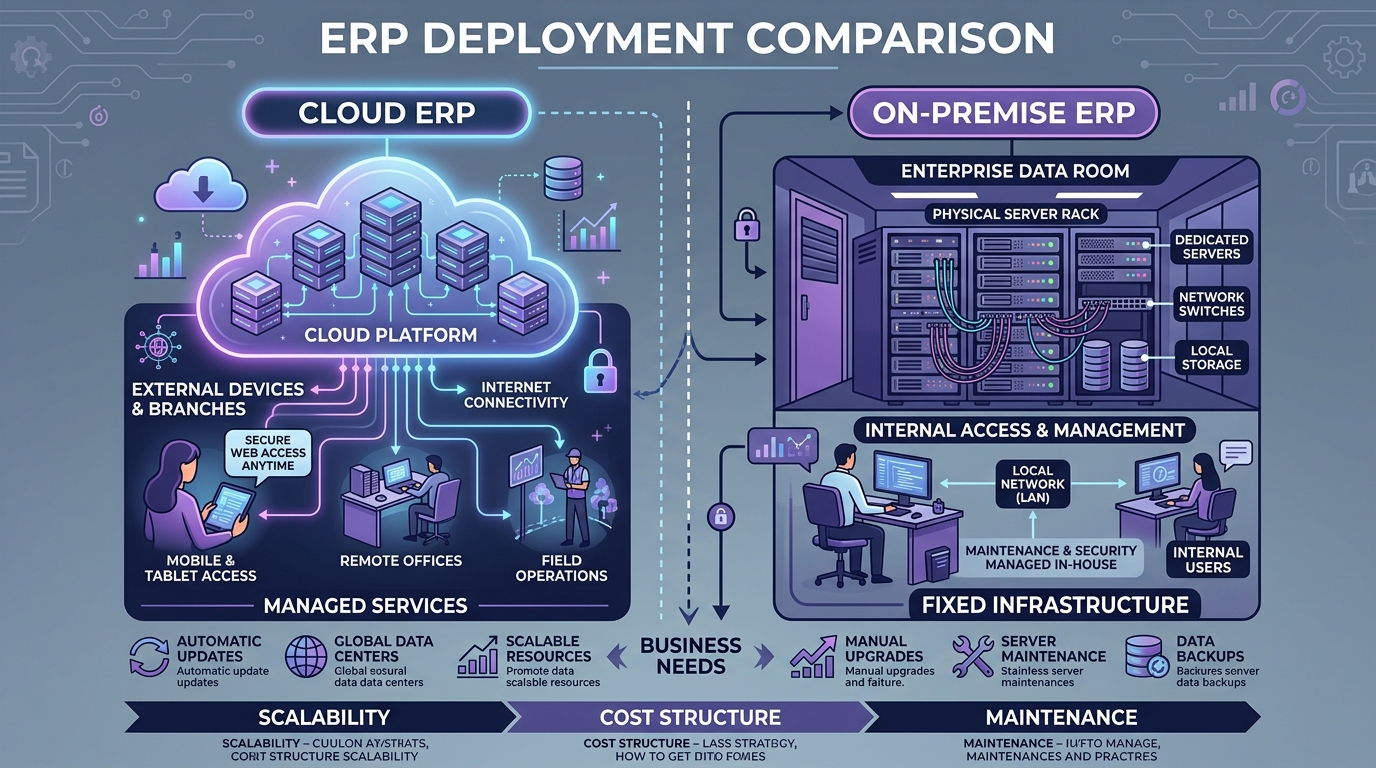
Cloud ERP is hosted on managed cloud infrastructure and accessed securely over the internet via web browsers and mobile apps. It minimizes upfront capital costs, automates software updates and off-site backups, and scales instantly. On-Premise ERP is installed on physical servers located within the company's facility, requiring dedicated in-house IT staff, manual backup protocols, and higher upfront hardware investments.
How Cloud ERP and On-Premise ERP Work
Cloud ERP Architecture
Users across sales, purchasing, inventory, manufacturing, and accounts connect over HTTPS to secure, load-balanced cloud servers.
↓ (Encrypted HTTPS / REST APIs)
High-Availability Cloud Platform
↓
Automated Multi-Zone Database Hub
On-Premise ERP Architecture
Users access a physical server situated inside the company's local office network (LAN), requiring VPNs for external access.
↓ (Local Area Network / VPN)
Physical In-House Server Rack
↓
Local Database & Tape/NAS Backups
15-Dimension Comparison: Cloud vs. On-Premise ERP
| Evaluation Dimension | Cloud ERP (SaaS) | On-Premise ERP |
|---|---|---|
| Hosting Environment | Managed Tier-3/4 Cloud Data Center | Local Company Server Room |
| Initial Capital Outlay (CapEx) | Low (Zero hardware purchases) | High (Servers, UPS, AC, Networking) |
| Pricing Model | Predictable subscription (OpEx) | Perpetual license + annual AMC |
| Deployment Speed | Fast (4 to 8 weeks) | Longer (3 to 6+ months) |
| Server Management | 100% handled by ERP provider | Requires dedicated in-house IT team |
| Accessibility | Secure web & mobile access anywhere | Restricted to LAN; requires complex VPNs |
| Multi-Warehouse Sync | Real-time native multi-site sync | Requires expensive site-to-site leases |
| Scalability | Elastic user & storage upgrades | Requires purchasing larger servers |
| Software Upgrades | Automatic & seamless | Manual scheduling & IT deployment |
| Data Backups | Automated, off-site multi-region backups | Manual tape/NAS backup procedures |
| Disaster Recovery | Built-in failover redundancy | Requires secondary off-site facility |
| IT Staff Requirements | Minimal (focus on business processes) | Heavy (systems, network, database admins) |
| Hardware Obsolescence | Zero hardware lifecycle risk | Server replacement every 4–5 years |
| Internet Dependency | Requires stable broadband connection | Works locally during internet outages |
| Data Ownership | Full export access (JSON/Excel/SQL) | Direct physical control of hard drives |
5-Year Total Cost of Ownership (TCO) Analysis
A common executive misconception is assuming on-premise ERP is cheaper because you "own" the software. When factoring in total hidden operational costs over 5 years, the math changes significantly:
Cloud ERP 5-Year Costs
- ✓ Predictable annual/monthly SaaS subscription
- ✓ Initial configuration & data migration
- ✓ Zero server hardware or cooling power bills
- ✓ Zero database licensing (included)
- ✓ Zero server hardware replacement costs
On-Premise 5-Year Hidden Costs
- • High initial perpetual license fees
- • Enterprise server hardware, UPS, and firewall appliances
- • Server OS and Relational Database licenses
- • In-house IT administrator salaries & training
- • 18–22% Annual Maintenance Contracts (AMC)
Enterprise Security & Disaster Recovery: Debunking the Myths
A persistent belief among some business owners is: "Our data is safer on a physical server in our office."
In reality, a local office server is vulnerable to hardware disk crashes, ransomware viruses, localized power surges, fire damage, physical theft, and disgruntled employees copying files onto USB drives.
Modern Cloud ERP systems operate within world-class Tier-3/4 data centers featuring enterprise-grade security protocols that most SMEs cannot replicate internally:
- End-to-End Encryption: AES-256 encryption at rest and TLS 1.3 encryption in transit.
- Automated Off-Site Backups: Point-in-time recovery with copies stored across geographically separated data zones.
- Continuous Security Patching: Operating system vulnerabilities and firewall rules updated 24/7 without user intervention.
- Granular Role-Based Permissions (RBAC): Strict departmental access control protecting margins and formulas.
Multi-Warehouse & Remote Operations
If your business operates multiple branches, regional warehouses, or factory sheds, Cloud ERP connects all locations natively:
A Practical 5-Star Decision Matrix
| Key Business Requirement | Cloud ERP | On-Premise ERP |
|---|---|---|
| Zero Server Maintenance Overhead | ⭐⭐⭐⭐⭐ | ⭐⭐ |
| Remote & Smartphone Access | ⭐⭐⭐⭐⭐ | ⭐⭐⭐ |
| Multi-Warehouse Coordination | ⭐⭐⭐⭐⭐ | ⭐⭐⭐ |
| Fast Implementation (Under 2 Months) | ⭐⭐⭐⭐⭐ | ⭐⭐⭐ |
| Small or Non-Existent In-House IT Team | ⭐⭐⭐⭐⭐ | ⭐⭐ |
| Direct Physical Hardware Control | ⭐⭐ | ⭐⭐⭐⭐⭐ |
| Operation During Complete Internet Blackouts | ⭐⭐⭐ | ⭐⭐⭐⭐⭐ |
| Automated Geographically Redundant Backups | ⭐⭐⭐⭐⭐ | ⭐⭐ |
Hybrid ERP: The Best of Both Worlds
For specialized manufacturing operations with heavy shop-floor automation, a Hybrid ERP architecture offers an optimal balance:
- Cloud Hub: Manages Sales, Procurement, Multi-Warehouse Inventory, Accounts, GST Billing, and Executive Dashboards.
- Local Shop-Floor Gateways: Interfaces directly with CNC machines, weighbridges, and PLC sensors, synchronizing data batches to the cloud automatically.
10-Step Migration Blueprint: Moving from On-Premise to Cloud ERP
Transitioning from aging legacy servers to cloud ERP follows a structured 10-step protocol:
- Audit Legacy Infrastructure: Catalog existing modules, custom scripts, and database sizes.
- Clean Legacy Master Records: Purge duplicate customers, inactive vendors, and obsolete item codes.
- Map Database Schemas: Align legacy table columns with cloud ERP data structures.
- Configure Cloud Tenant: Set up users, roles, tax rules, and warehouse hierarchies.
- Test API & Hardware Connectors: Validate barcode scanners, label printers, and banking gateways.
- Execute Trial Sandbox Migration: Import master data and verify trial balance reconciliation.
- Perform End-to-End UAT: Run simulated customer orders from quote to delivery and invoicing.
- Conduct Role-Based User Training: Ensure departmental champions master daily cloud workflows.
- Execute Final Cutover: Freeze legacy system, import final opening balances, and go live.
- Post-Go-Live Hypercare: Monitor cloud performance and provide instant user support.
20 Essential Questions to Ask ERP Vendors
Ask Cloud ERP Vendors:
- Where is our data physically hosted?
- How frequently are backups performed & retained?
- What is your guaranteed uptime SLA?
- Can we export full raw database backups anytime?
- How are software updates and security patches applied?
Ask On-Premise Vendors:
- What exact server hardware & OS specs are required?
- What database licenses are mandatory?
- How are remote users and branches secured?
- What is the annual AMC percentage?
- What is the disaster recovery and failover procedure?
How Uttercode Cloud ERP Empowers Growing Businesses
Uttercode ERP delivers an enterprise-grade cloud business operating system tailored for manufacturing, distribution, and growing SMEs. With zero server hardware requirements, instant mobile accessibility, automated off-site backups, and standard REST APIs, Uttercode enables you to run connected operations with maximum uptime and peace of mind.
Ready to Upgrade to Modern Cloud ERP?
Discover how Uttercode Cloud ERP eliminates server headaches, connects all your warehouses in real time, and scales seamlessly with your business growth.
Frequently Asked Questions
Is Cloud ERP better than On-Premise ERP?
Neither deployment model is universally better. Cloud ERP shifts infrastructure management, automated backups, and server maintenance to the cloud vendor, making it ideal for fast-growing SMEs. On-Premise ERP provides complete physical data control for organizations with dedicated in-house IT infrastructure.
Is Cloud ERP cheaper than On-Premise ERP?
Cloud ERP has a significantly lower upfront CapEx because no server hardware or data-center setup is required. When comparing Total Cost of Ownership (TCO) over 5 years, Cloud ERP often proves more cost-effective for SMEs by eliminating dedicated server hardware replacements, power/cooling costs, and IT infrastructure salaries.
Is Cloud ERP secure?
Yes. Enterprise cloud ERP providers utilize advanced security protocols, including AES-256 data encryption at rest and in transit, multi-factor authentication (MFA), automated off-site backups, 24/7 security monitoring, and SOC2/ISO compliance.
Does Cloud ERP require continuous internet access?
Yes, Cloud ERP requires network connectivity. Growing manufacturing businesses typically maintain redundant ISP connections (such as dual fiber broadband and 5G backup) to guarantee 99.9% uptime.
Can an On-Premise ERP be accessed remotely?
Yes, but it requires configuring virtual private networks (VPNs), secure firewall gateways, static IP addresses, and remote desktop services, which increase IT complexity and maintenance overhead.
Can Cloud ERP be customized?
Yes. Modern cloud ERP platforms support custom workflows, print templates, custom fields, approval matrices, and REST API integrations without modifying core software code.
How does Cloud ERP support multi-warehouse operations?
Cloud ERP connects all factories, regional warehouses, retail outlets, and mobile sales staff to a single centralized database in real time without setting up complex site-to-site network bridges.
What is Hybrid ERP?
A Hybrid ERP combines cloud-based central management (Sales, Finance, Purchasing, Executive Analytics) with local on-premise systems for specialized factory shop-floor machine automation.
Can a business migrate from On-Premise ERP to Cloud ERP?
Yes. The migration process involves auditing existing modules, cleaning master records, mapping database schemas, configuring cloud workflows, testing UAT scenarios, and executing cutover.
Which deployment model is best for manufacturing SMEs?
For 90% of growing manufacturing SMEs, Cloud ERP is the superior choice because it provides fast 4-8 week rollouts, zero hardware management, mobile shop-floor scanning, and predictable monthly operating costs.
Conclusion
The choice between Cloud ERP and On-Premise ERP is ultimately a strategic business decision. Cloud ERP empowers growing enterprises to focus 100% of their energy on serving customers, optimizing manufacturing, and expanding market reach—without worrying about server outages or backup failures.
While on-premise deployments still serve organizations with highly specialized internal data requirements, the overwhelming trend across modern industry is toward the speed, agility, and security of Cloud ERP.
"Don't choose your ERP deployment model based on legacy habits. Choose the model that gives your business the agility to scale tomorrow."